SmartCal LiveWallpaper1.1
Publisher Description
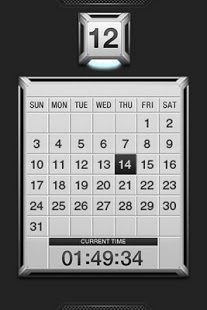
It is a live wallpaper for those who master smartly.
by "US uistore.net"
★We finished a calendar and the time in metal texture elegantly.
★Able to store it on the SD card.(*OS2.2 or more)(*When you set it as wall paper, please save (move) it in the main body. The setting may returns to a default when you reboot.)
※It is free trial for 24hours.
※Setting method:home screen>menu>Wallpaper>Live Wallpaper
※According to memory conditions,it may not be able to set normally. In that case, please restart your portable terminal and set it again.
※If you exit live wallpaper,it may not be able to exit normally by using task end application program such as task killer. Please exit it after setting other live wallpapers.
※When not normally working by updating it, it improves it when doing by reinstalling it after uninstalling it.
※When updating it with setting the wallpaper, the screen may turn black in the case of OS2.1.You can set it correctly by resetting after setting other live wall papers. It's a feature for OS, and it contains improved OS2.2.
About SmartCal LiveWallpaper
The company that develops SmartCal LiveWallpaper is US uistore.net. The latest version released by its developer is 1.1. This app was rated by 1 users of our site and has an average rating of 5.0.
To install SmartCal LiveWallpaper on your Android device, just click the green Continue To App button above to start the installation process. The app is listed on our website since 2011-10-23 and was downloaded 3 times. We have already checked if the download link is safe, however for your own protection we recommend that you scan the downloaded app with your antivirus. Your antivirus may detect the SmartCal LiveWallpaper as malware as malware if the download link to us.uistore.fieldsystem.smartcal is broken.
How to install SmartCal LiveWallpaper on your Android device:
- Click on the Continue To App button on our website. This will redirect you to Google Play.
- Once the SmartCal LiveWallpaper is shown in the Google Play listing of your Android device, you can start its download and installation. Tap on the Install button located below the search bar and to the right of the app icon.
- A pop-up window with the permissions required by SmartCal LiveWallpaper will be shown. Click on Accept to continue the process.
- SmartCal LiveWallpaper will be downloaded onto your device, displaying a progress. Once the download completes, the installation will start and you'll get a notification after the installation is finished.
Program Details
System requirements
Download information
Pricing
Version History
version 1.1
posted on 2011-10-23
version 1.1
posted on 2011-10-23
Several fixes and updates
